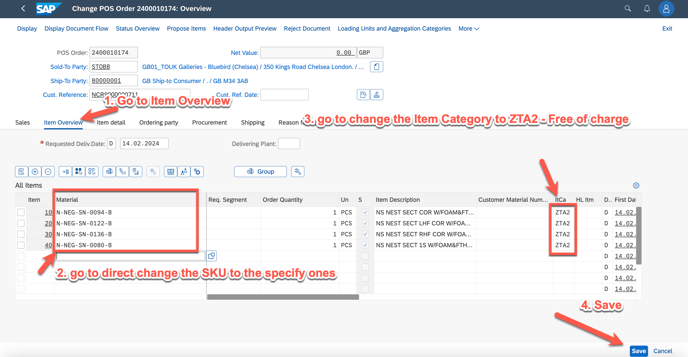
There are 2 solutions for this case:
Solution #1: To cancel the SO by rejecting the ITEMs, close the NCR document, and go to create a new NCR number and give the correct SKU number.
1. how to reject a SO by ITEM please refer to SOP: https://itsm.halocreativedesign.com/en/knowledge/sap-sd-cancel-/-reject-certain-so-item-in-sap
2. go to ZSD007A to create new NCR document.
Solution#2: go to change the SKU to new SKU in the created SO, but this must be communicated with AM team, as the SKU change will impact to production arrange.
1. go to app VA02 - change Sales document

2. change SKU and Item Catery as below