This is for the SAP web version.
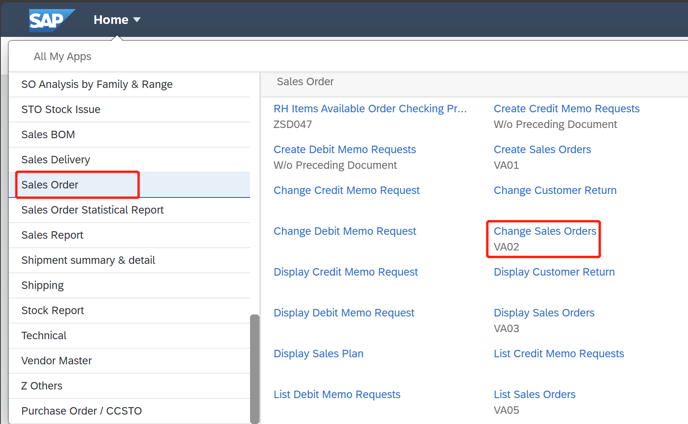
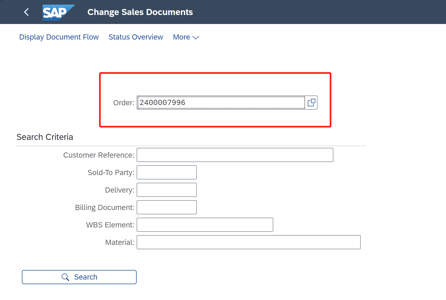
1. Go to the "Change Sales Orders" function (VA02), and enter the SAP Order number.
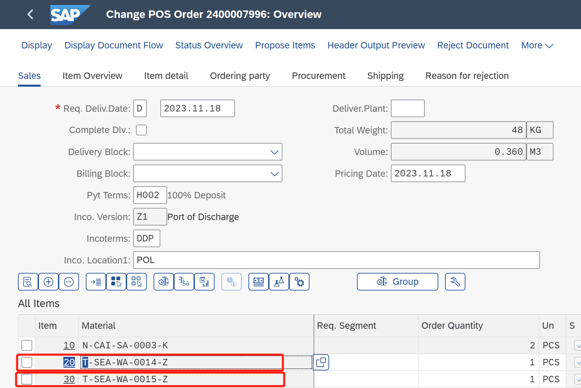
2. Double click Items one by one
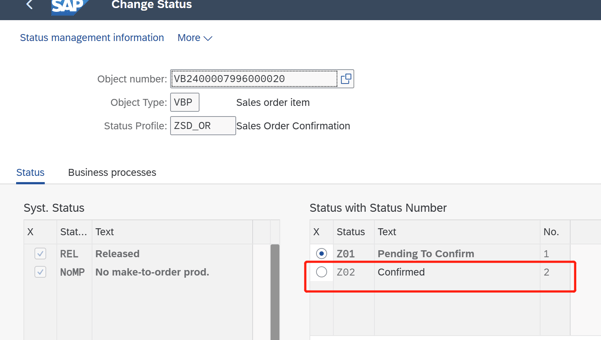
3. Locate the "Status" option, you can then see the "User Status" shows Z01, which means this item is locked. So you need to manually change the status from Z01 to Z02.
In this page, click "obj status" the blue highlighted button as follows:
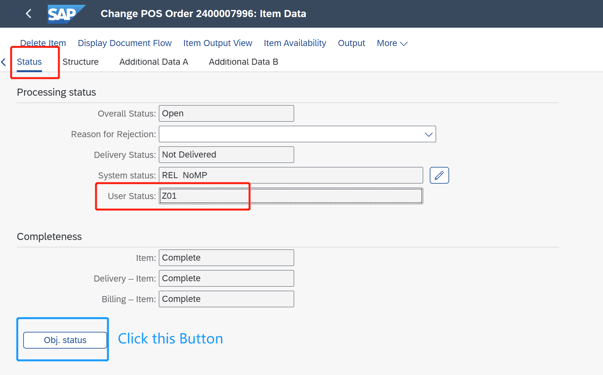
4. Now, you can change the status from Z01 to Z02 (this needs to be done for each item individually):
------------------------------------------------------------------------------------------------------------------------------------------------------------------------------------------------------------------------------------------------------------------------------------------------------------------------------------------------------
This is for the SAP app option instead of the web option:
1. T-Code VA02 change the Sales Order and click twice at Item 20 and Itme 30
2. Then, turn to "Status" Page. Click "Obj.status"
3. Finally, please correct the status from Z01 to Z02 for the item.
4. The same step with Item 30. The Sales order is alright and you can create the delivery note then.