- Received request from designer:
- When a request is received from designer. Product Launch Team will proceed with the steps below *Please be aware that it should be “ 1 size 1 line 1 supplier”*
- Create Product in Halo Base
- Go to Category View in Product Development Table.
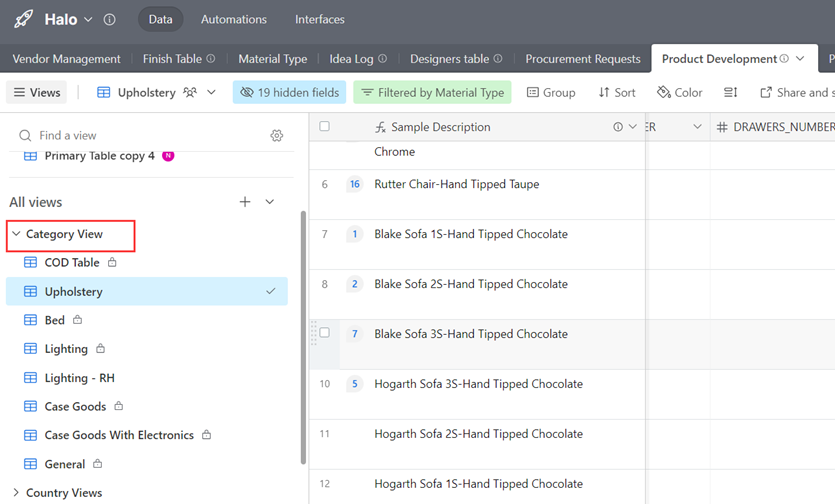
- Create a product record in the related category view.
- Enrich the category request data.
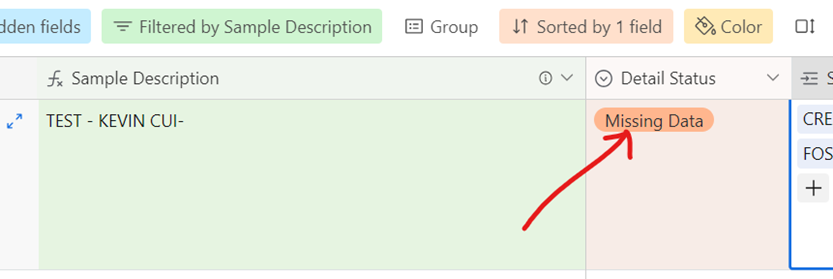
- Click the Detail Status and Approved, the data will be sent to PIM at once.

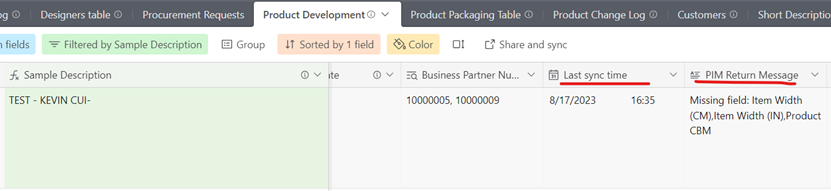
- The Detail Status will update to Missing data if the request field is not complete. Check the Last sync time and PIM return message, complete the data and click Approved again.
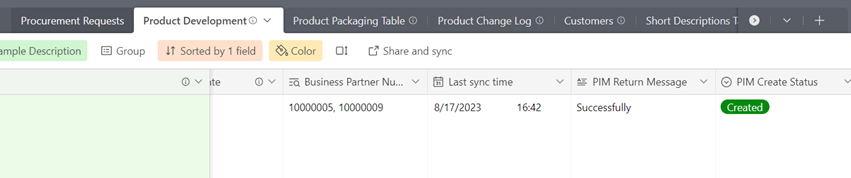
- Create success in PIM, shows message below. PIM Create Status shows Created for first time creation. And Detail Status update to Active.
- Go to Category View in Product Development Table.
- Create new material in Halo Base
- Go to Material Type table in Halo Base.
- Add a new material in blank line.
- Generate new batch code after running out of Material Code.
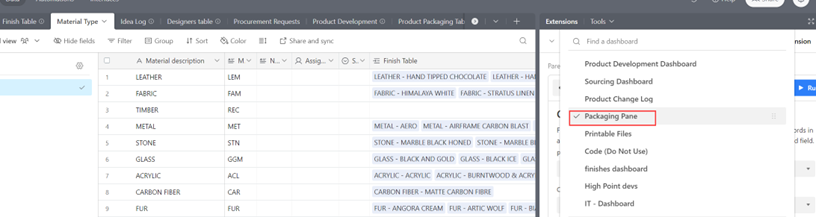
- Go to Extensions on the right corner.
- Click Packaging Pane and go to Lookup Table Generator
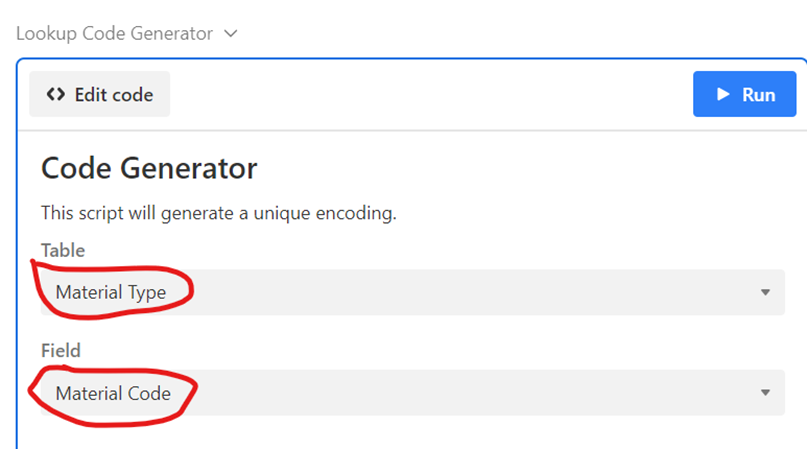
- Select Material Type table and Material Code field. Click Run.
- Click how many codes need to be generated and click next.

- Create new finish in Halo Base
- Go to Finish Table in Halo Base.
- Add a new record for new finish.
- Filling the Price, the formula will bring up match Pricing Tier.

- Link to Material Type record, this is mandatory and single select.
- Edit the short description of finish in Material Concatenation, this is mandatory and will show in Product Short Description.

- Finish Table sync to Category Management Base auto.
- The category management team confirms the final finish name and approves in Final Finish Name field.

- If add a MARBLE finish, please select the “Marble Origin”.
- Generate new batch code after running out of Finish Code.
- Go to Extensions on the right corner.
- Click Packaging Pane and go to Lookup Table Generator
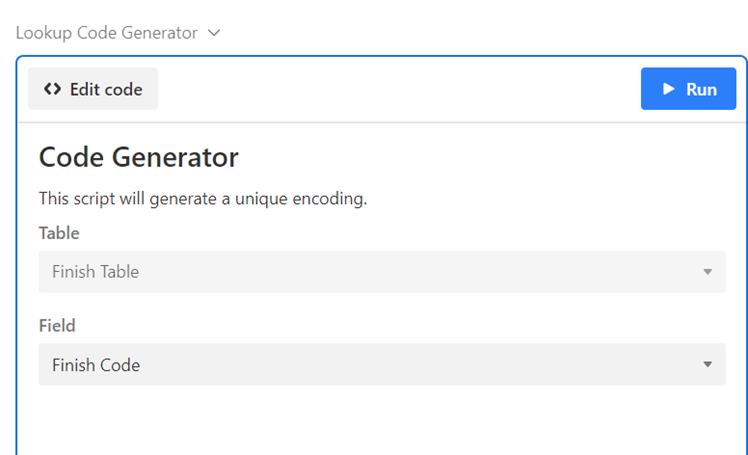
- Select Finish Table and Finish Code field. Click Run.
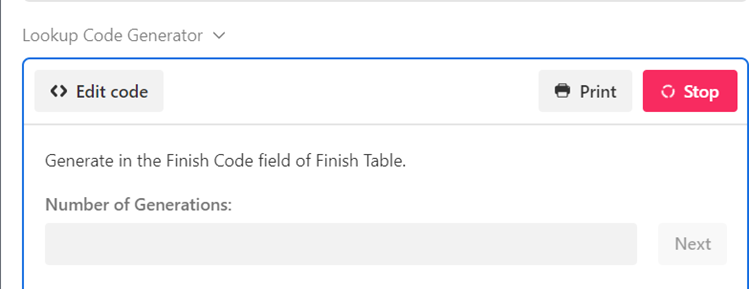
- Click how many codes need to be generated and click next.
- Create categories lookup table in Category Management Base
- Create Account Group table
- Add the new account group in the blank line.
- Generate new batch code after running out of Account Group Code.
- Go to Extensions on the right corner.
- Go to Lookup Table Generator
- Select Account Group table and Account Group Code field. Click Run.
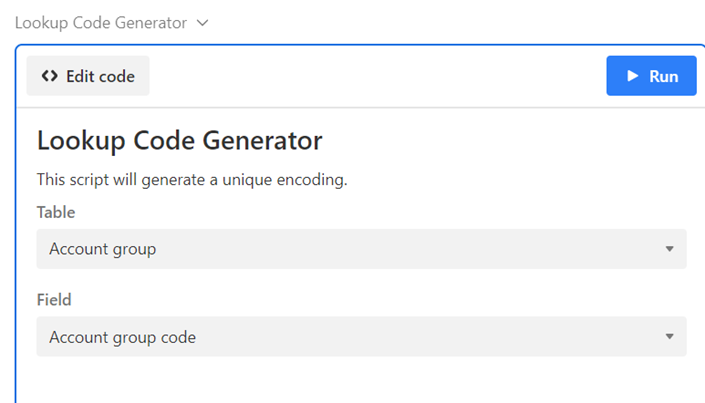
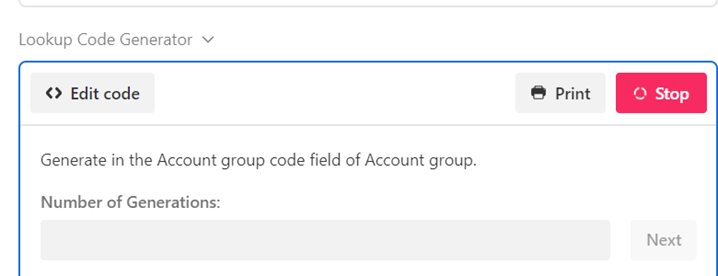
- Click how many codes need to be generated and click next.
- Create Item Group table
- Add the new item group in the blank line.
- Link to Account Group record, this is mandatory and single select.
- Generate new batch code after running out of Item Group Code.
- Go to Extensions on the right corner.
- Go to Lookup Table Generator
- Select Item Group table and Item Group Code field. Click Run.
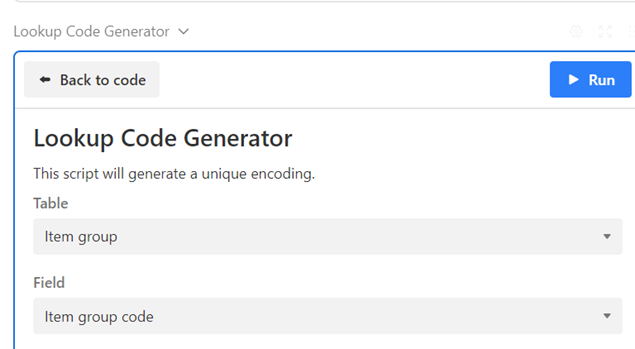
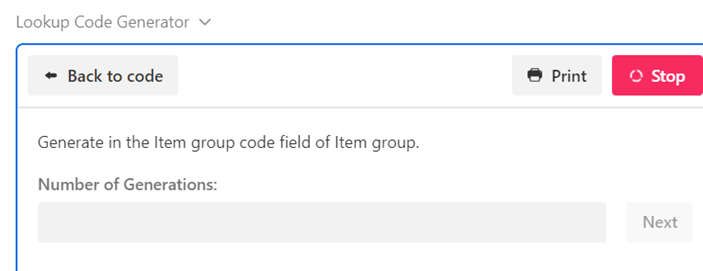
- Click how many codes need to be generated and click next.
- Create Product Range table
- Add the new product range in the blank line.
- Generate new batch code after running out of Product Range Code.
- Go to Extensions on the right corner.
- Go to Lookup Table Generator
- Select Product Range table and Product Range Code field. Click Run.
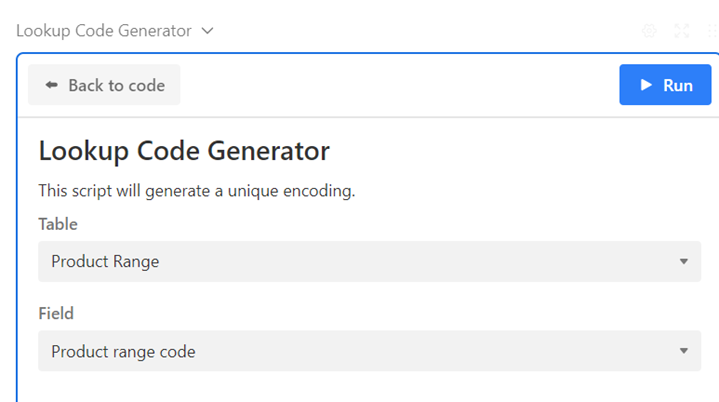
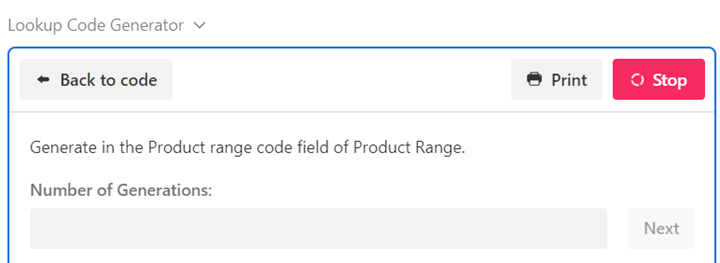
- Click how many codes need to be generated and click next.
- Create Category 7 table
- Add the new category 7 in the blank line.
- Generate new batch code after running out of Category 7 Code.
- Go to Extensions on the right corner.
- Go to Lookup Table Generator
- Select Category 7 table and Brand Code field. Click Run.
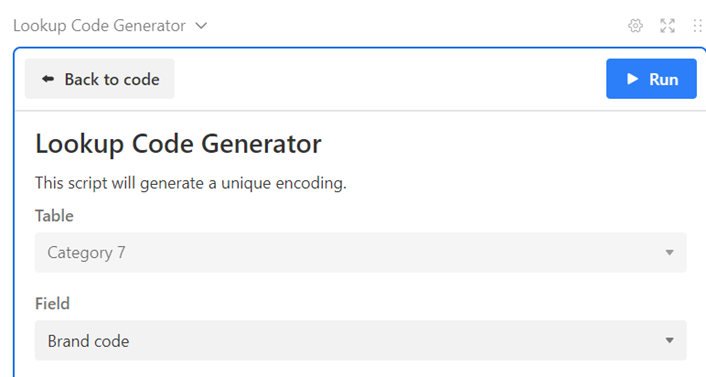
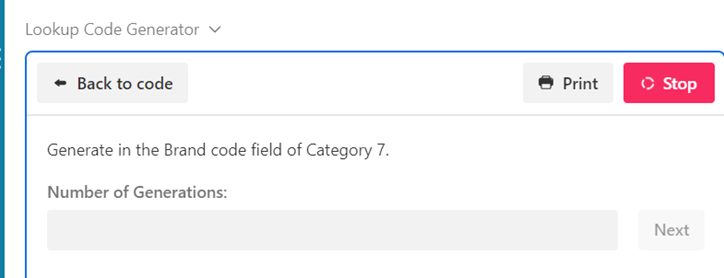
- Click how many codes need to be generated and click next.
- Create Category 8 table
- Add the new category 8 in the blank line.
- Generate new batch code after running out of Category 8 Code.
- Go to Extensions on the right corner.
- Go to Lookup Table Generator
- Select Category 8 table and Category Code field. Click Run.
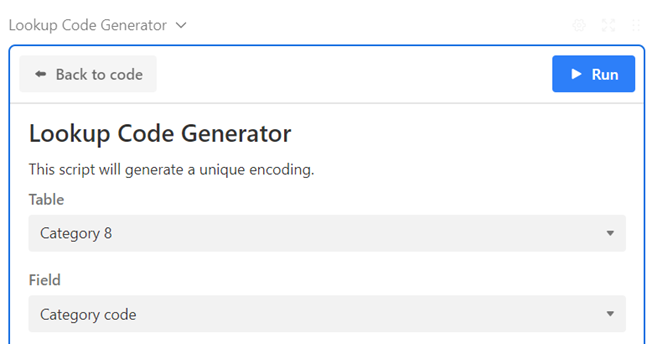
- Click how many codes need to be generated and click next.
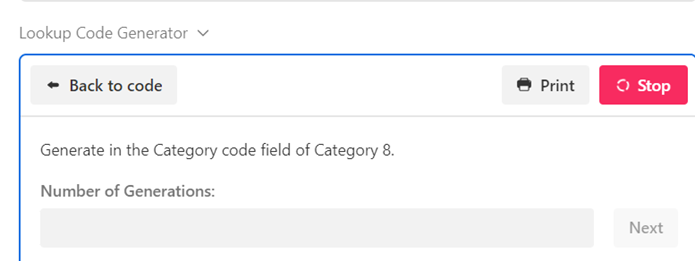
- Create Category 9 table
- Add the new category 9 in the blank line.
- Link to Category 8 record, this is mandatory and single select.
- Generate new batch code after running out of Category 9 Code.
- Go to Extensions on the right corner.
- Go to Lookup Table Generator
- Select Category 9 table and Sub Category Code field. Click Run.
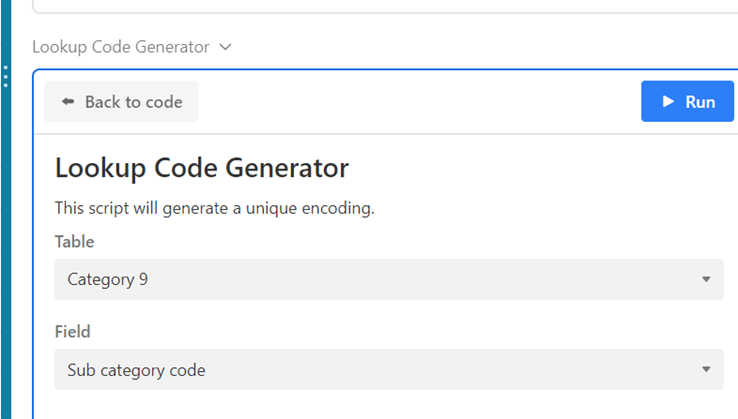
- Click how many codes need to be generated and click next.
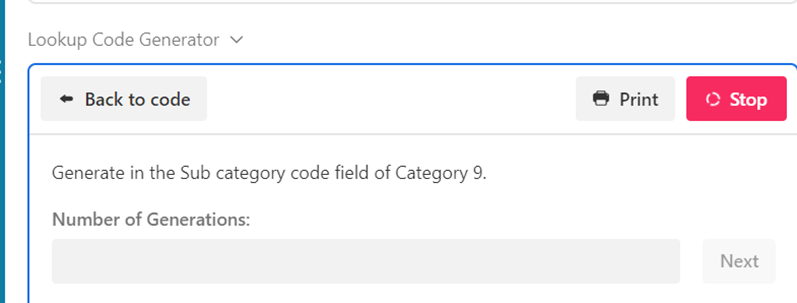
- Create Category 10 table
- Add the new category 10 in the blank line.
- Link to Category 9 record, this is mandatory and single select.
- Edit Short Description of Category 10, this is mandatory and will show in Product Short Description.
- Generate new batch code after running out of Category 10 Code.
- Go to Extensions on the right corner.
- Go to Lookup Table Generator
- Select Category 10 table and Sub-sub Category Code field. Click Run.
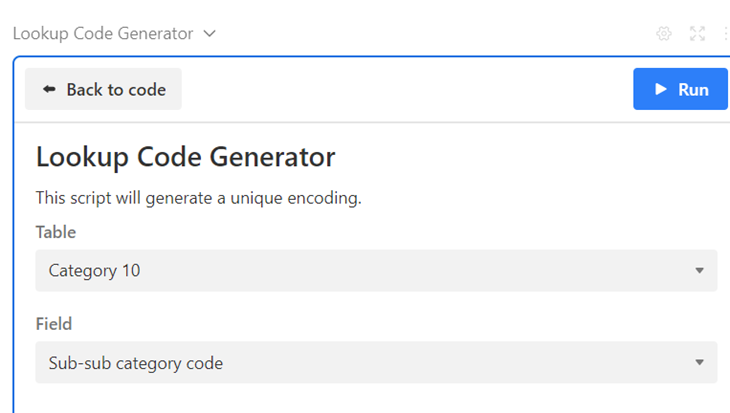
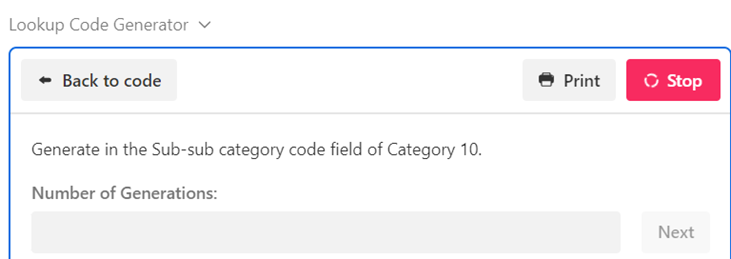
- Click how many codes need to be generated and click next.
- Create Category 11 table
- Add the new category 11 in the blank line.
- Generate new batch code after running out of Category 11 Code.
- Go to Extensions on the right corner.
- Go to Lookup Table Generator
- Select Category 11 table and Size Code field. Click Run.
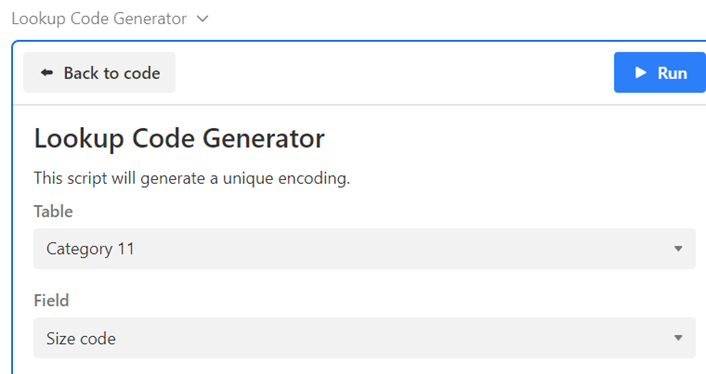
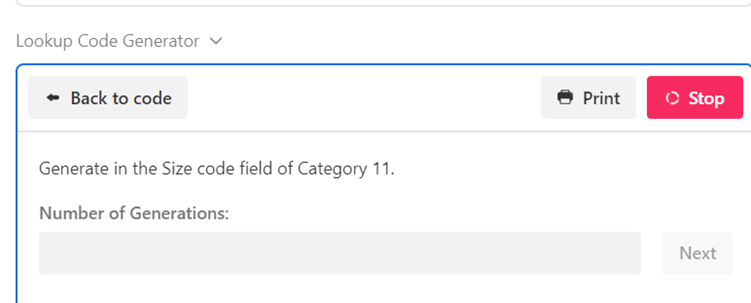
- Click how many codes need to be generated and click next.
- Create Category 12 table
- Add the new category 12 in the blank line.
- Generate new batch code after running out of Category 12 Code.
- Go to Extensions on the right corner.
- Go to Lookup Table Generator
- Select Category 12 table and Feature Code field. Click Run.
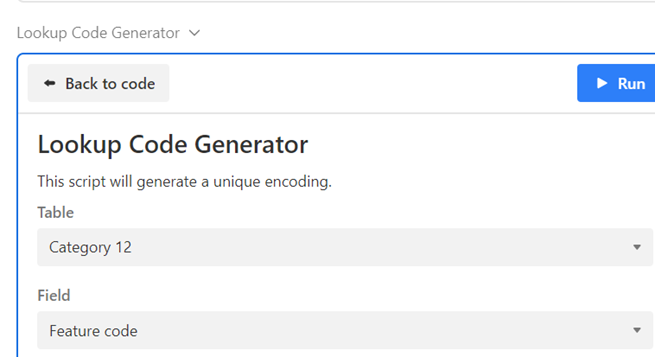
- Click how many codes need to be generated and click next.
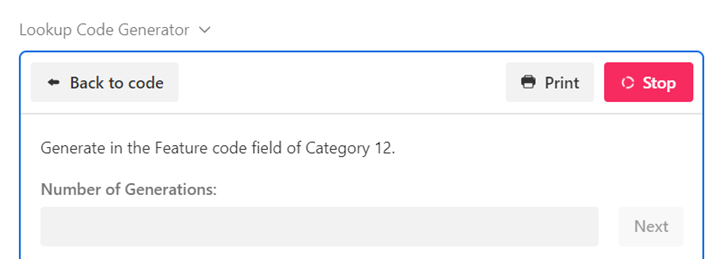
- Create Category 13 table
- Add the new category 13 in the blank line.
- Update the Price Tier formula in Finish Table in Halo Base.
- Update the Price Tier Code formula in Finish Table in Halo Base.
- Generate new batch code after running out of Category 13 Code.
- Go to Extensions on the right corner.
- Go to Lookup Table Generator
- Select Category 13 table and Pricing Group Code field. Click Run.
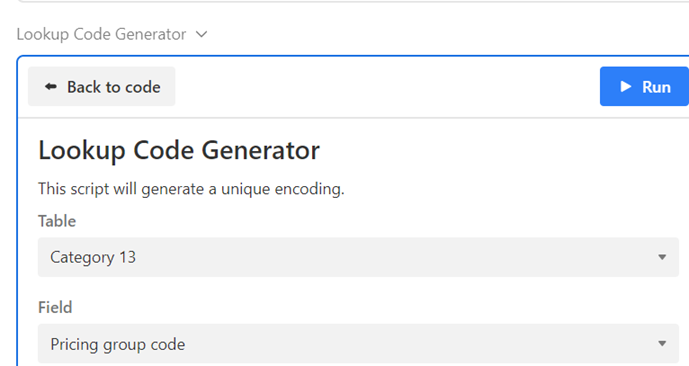
- Click how many codes need to be generated and click next.
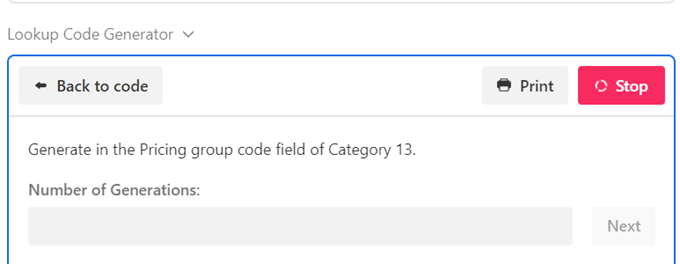
- Create FR table
- Add the new FR in the blank line.
- Inform workshop of the new standard.
- Generate new batch code after running out of FR code.
- Go to Extensions on the right corner.
- Go to Lookup Table Generator
- Select FR Table and FR Code field. Click Run.
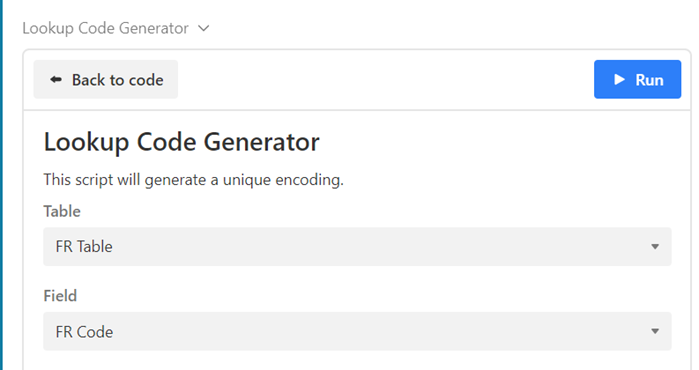
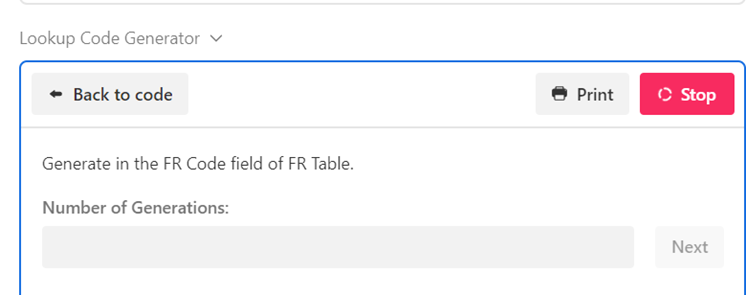
- Click how many codes need to be generated and click next.
- Go to Product Development table in Category Management Base
- Fill all the categories field.
- Fill the Item Group, system will bring up the Account Group.
- Fill the Category 10, the system will bring up Category 8 & Category 9.
- When the PIM Create Status is Created, the data will sync to PIM auto.
7. Create Permutations in Category Management Base
- Go to Junction Table
- Go to Extensions on the right corner.
- Go to Product Permutation Generator.
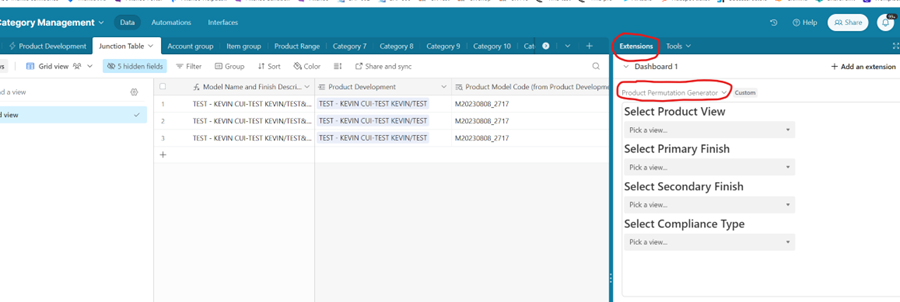
- Select what product and finish and which FR you want to create. The system will show how many records to be create.

- Click Generate Coding and check the records.
- Enrich the request data.
- Check the PIM Return Message and Last sync time. The item has been created in PIM if the Sync status is successful.

- Please pay ATTENTION: the combination key filed in Product Permutation Generator cannot update in the product line. Please follow step 4 to create a new line and inform GPDB to delete the wrong record.
- PIM will generate the SKU auto. when categories data complete and sync the SKU back to Junction Table.
8. GPDB informs costing to quote and get the selling price.
9. Airtable and PIM data mapping
- Model data mapping
|
Airtable Base |
Airtable Table |
Airtable Field |
PIM Field |
PIM level |
Mandatory or Optional |
|
Halo |
Product Development |
model description |
Model_Desc |
Common |
M |
|
Halo |
Product Development |
SRF Number |
SRF |
Common |
M |
|
Halo |
Product Development |
Drawings |
DRAWING |
Common |
M |
|
Halo |
Product Development |
Hi Res - Photography |
IMAGE_SOURCE |
Common |
O: Innovation type= Resourcing/Line Extension without Sample/Product Improvement |
|
Halo |
Product Development |
Item Width (CM) |
LENGTH |
Common |
M |
|
Halo |
Product Development |
Item Depth (CM) |
WIDTH |
Common |
M |
|
Halo |
Product Development |
Item Height (CM) |
HEIGHT |
Common |
M |
|
Halo |
Product Development |
Item Width (IN) |
LENGTH_INCH |
Common |
M |
|
Halo |
Product Development |
Item Depth (IN) |
WIDTH_INCH |
Common |
M |
|
Halo |
Product Development |
Item Height (IN |
HEIGHT_INCH |
Common |
M |
|
Halo |
Product Development |
Total Packed CBM |
CBM |
Common |
M |
|
Halo |
Product Development |
Units per Box |
PACKING_QTY |
Common |
M |
|
Halo |
Product Development |
Box Count |
CARTON_QTY |
Common |
M |
|
Halo |
Product Development |
Units per container |
LOADABILITY |
Common |
O |
|
Halo |
Product Development |
Product Test Report |
TEST_REPORT |
Common |
O: Innovation type= Resourcing/Line Extension without Sample/Product Improvement, |
|
Halo |
Product Development |
Assembly Instructions |
ASSEMBLY_INSTRUCTION |
Common |
O |
|
Halo |
Product Development |
Total Gross Weight (KG) |
GW |
Common |
M |
|
Halo |
Product Development |
Total Net Weight (KG) |
NW |
Common |
M |
|
Halo |
Product Development |
Total Gross Weight (LB) |
GW_LB |
Common |
M |
|
Halo |
Product Development |
Total Net Weight (LB) |
NW_LB |
Common |
M |
|
Halo |
Product Development |
Product Main Material |
MAIN_MATERIAL |
Common; |
M except lighting or furniture with lighting |
|
Halo |
Product Development |
Commodity Code |
COMMODITY_CODE |
Common; |
M except Lighting or furniture with lighting |
|
Halo |
Product Development |
Launch Venue |
LAUNCH_VENUE |
Variant 2 |
M |
|
Halo |
Product Development |
Packing Instruction |
PACKING_INSTRUCTION |
Common |
O |
|
Halo |
Product Development |
DTBL_HEIGH_TO_UNDERSIDE (CM) |
DTBL_HEIGH_TO_UNDERSIDE |
Common |
M |
|
Halo |
Product Development |
DTBL_HEIGH_TO_UNDERSIDE_INCH |
DTBL_HEIGH_TO_UNDERSIDE_INCH |
Common |
M |
|
Halo |
Product Development |
DTBL_LENGTH_BETWEEN_LEGS (CM) |
DTBL_LENGTH_BETWEEN_LEGS |
Common |
M |
|
Halo |
Product Development |
DTBL_LENGTH_BETWEEN_LEGS_INCH |
DTBL_LENGTH_BETWEEN_LEGS_INCH |
Common |
M |
|
Halo |
Product Development |
SPECIAL_CONSTRUCTION |
SPECIAL_CONSTRUCTION |
Common |
M |
|
Halo |
Product Development |
SHELF_NUMBER |
SHELF_NUMBER |
Common |
M |
|
Halo |
Product Development |
DRAWERS_NUMBER |
DRAWERS_NUMBER |
Common |
M |
|
Halo |
Product Development |
LINING_MATERIAL |
LINING_MATERIAL |
Common |
M |
|
Halo |
Product Development |
ASSEMBLY REQUIRED |
ASSEMBLY_REQUIRED |
Common |
M |
|
Halo |
Product Development |
WOOD TYPE |
WOOD_TYPE |
Variant 1 |
M |
|
Halo |
Product Development |
METAL_TYPE |
METAL_TYPE |
Variant 1 |
M |
|
Halo |
Product Development |
NUMBER OF BULBS |
NUMBER_OF_BULB |
Common |
M |
|
Halo |
Product Development |
STANDARD HANGING SYSTEM MAX LENGTH(CM) |
STANDARD_HANGING_SYSTEM_MAX_LENGTH |
Common |
M |
|
Halo |
Product Development |
ADJUSTABLE CHAIN OR ROD |
ADJUSTABLE_CHAIN_OR_ROD |
Common |
M |
|
Halo |
Product Development |
FRAME_AVAILABILITY |
FRAME_AVAILABILITY |
Common |
M |
|
Halo |
Product Development |
AVAILABLE_COUNTRY |
AVAILABLE_COUNTRY |
Common |
M |
|
Halo |
Product Development |
LIGHT SOURCE REPLACEABLE |
LIGHT_SOURCE_REPLACEABLE |
Common |
M |
|
Halo |
Product Development |
HANGING SYSTEM |
HANGING_SYSTEM |
Common |
M |
|
Halo |
Product Development |
SEAT LENGTH (CM) |
SEAT_LENGTH |
Common |
M |
|
Halo |
Product Development |
SEAT WIDTH (CM) |
SEAT_WIDTH |
Common |
M |
|
Halo |
Product Development |
SEAT HEIGHT (CM) |
SEAT_HEIGHT |
Common |
M |
|
Halo |
Product Development |
ARM HEIGHT (CM) |
ARM_HEIGHT |
Common |
M |
|
Halo |
Product Development |
FRAME |
FRAME |
Common |
M |
|
Halo |
Product Development |
SEAT SUSPENSION |
SEAT_SUSPENSION |
Common |
M |
|
Halo |
Product Development |
BACK SUSPENSION |
BACK_SUSPENSION |
Common |
M |
|
Halo |
Product Development |
ARM SUSPENSION |
ARM_SUSPENSION |
Common |
M |
|
Halo |
Product Development |
SEAT CUSHION FILLING |
SEAT_CUSHION_FILLING |
Common |
M |
|
Halo |
Product Development |
BACK CUSHION FILLING |
BACK_CUSHION_FILLING |
Common |
M |
|
Halo |
Product Development |
FEET MATERIAL |
FEET_MATERIAL |
Common |
M |
|
Halo |
Product Development |
REMOVABLE ARMS |
REMOVABLE_ARMS |
Common |
M |
|
Halo |
Product Development |
REMOVABLE FEET |
REMOVABLE_FEET |
Common |
M |
|
Airtable Base |
Airtable Table |
Airtable Field |
PIM Table |
PIM Field |
PIM level |
Mandatory or Optional |
|
Halo |
Product Packaging Table |
CBM |
Package_cm_kg |
CBM_m3 |
Common |
M |
|
Halo |
Product Packaging Table |
Depth (CM |
Package_cm_kg |
WIDTH_cm |
Common |
M |
|
Halo |
Product Packaging Table |
Height (CM) |
Package_cm_kg |
HEIGHT_cm |
Common |
M |
|
Halo |
Product Packaging Table |
Width (CM) |
Package_cm_kg |
LENGTH_cm |
Common |
M |
|
Halo |
Product Packaging Table |
Depth 1 (CM) |
Package_cm_kg |
WIDTH_2_cm |
Common |
M when Shape type = L shape |
|
Halo |
Product Packaging Table |
Height 1 (CM) |
Package_cm_kg |
HEIGHT_2_cm |
Common |
M when Shape type = L shape |
|
Halo |
Product Packaging Table |
Net Weight (Kg) |
Package_cm_kg |
NW_kg |
Common |
M |
|
Halo |
Product Packaging Table |
Gross Weight (Kg) |
Package_cm_kg |
WEIGHT_kg |
Common |
M |
|
Airtable Base |
Airtable Table |
Airtable Field |
PIM Table |
PIM Field |
PIM level |
Mandatory or Optional |
|
Halo |
Lacey Act Table |
Material Count |
LACEY_ACT |
MATERIAL_COUNT |
Common |
M |
|
Halo |
Lacey Act Table |
Material Name |
LACEY_ACT |
MATERIAL_NAME |
Common |
M |
|
Halo |
Lacey Act Table |
Wood Usage |
LACEY_ACT |
WOOD_USAGE |
Common |
M |
|
Halo |
Lacey Act Table |
Common Name |
LACEY_ACT |
COMMON_NAME |
Common |
M |
|
Halo |
Lacey Act Table |
Genus (from Material Name) |
LACEY_ACT |
GENUS |
Common |
M |
|
Halo |
Lacey Act Table |
Species (from Material Name) |
LACEY_ACT |
SPECIES |
Common |
M |
|
Halo |
Lacey Act Table |
Scientific Names (from Material Name) |
LACEY_ACT |
SCIENTIFIC_NAMES |
Common |
M |
|
Halo |
Lacey Act Table |
Country of Harvest (from Material Name) |
LACEY_ACT |
COUNTRY_OF_HARVEST |
Common |
M |
|
Halo |
Lacey Act Table |
Supplier ID |
LACEY_ACT |
MANUFACTURER |
Common |
M |
|
Halo |
Lacey Act Table |
VALID FROM |
LACEY_ACT |
VALID_FROM |
Common |
M |
Product data mapping
|
Airtable Base |
Airtable Table |
Airtable Field |
PIM Field |
PIM level |
Mandatory or Optional |
|
Category Management |
Product Development |
Account group code (from Account group) (from ITEM GROUP) |
ACCOUNT_GROUP |
Common |
M |
|
Category Management |
Product Development |
Item group code (from ITEM GROUP) |
ITEM_GROUP |
Common |
M |
|
Category Management |
Product Development |
Category 10 code (from Category 10) |
CATEGORY10 |
Common |
M |
|
Category Management |
Product Development |
Category 9 code (from Category 10) |
CATEGORY9 |
Common |
M |
|
Category Management |
Product Development |
Category 8 code (from Category 10) |
CATEGORY8 |
Common |
M |
|
Category Management |
Product Development |
Category 7 code (from Category 7) |
CATEGORY7 |
Common |
M |
|
Category Management |
Product Development |
Category 11 code (from Category 11 description) |
CATEGORY11 |
Common |
M |
|
Category Management |
Product Development |
Product range code (from Product Range) |
PRODUCT_RANGE |
Common |
M |
|
Category Management |
Product Development |
Category 12 code (from Category 12 description) |
CATEGORY12 |
Common |
M |
|
Airtable Base |
Airtable Table |
Airtable Field |
PIM Table |
PIM Field |
PIM level |
Mandatory or Optional |
|
Category Management |
Junction Table |
Model Name and Finish Description |
|
FULL_DESC |
Variant 2 |
M |
|
Category Management |
Junction Table |
Primary Finish Code (from Primary Finish Table) |
|
CATEGORY5 |
Variant 2 |
M |
|
Category Management |
Junction Table |
Primary Material Code (from Primary Finish Table) |
|
CATEGORY6 |
Variant 2 |
M |
|
Category Management |
Junction Table |
Pricing group Code (from Primary Finish Table) |
|
CATEGORY13 |
Variant 2 |
M |
|
Category Management |
Junction Table |
Secondary Finish Code (from secondary finish table) |
|
CATEGORY15 |
Variant 2 |
M |
|
Category Management |
Junction Table |
Secondary Material Code (from Secondary Finish Table) |
|
CATEGORY16 |
Variant 2 |
M |
|
Category Management |
Junction Table |
FR Code (from FR Table) |
|
CATEGORY4 |
Variant 2 |
M |
|
Category Management |
Junction Table |
SAP Supplier ID (from Product Development) |
TRADING_SOURCE |
Supplier |
Variant 2 |
M |
|
Category Management |
Junction Table |
SAP Supplier ID (from Product Development) |
TRADING_SOURCE |
Manufacturer |
Variant 2 |
M |
|
Category Management |
Junction Table |
SAP Supplier ID (from Product Development) |
WOFE_SOURCE |
Supplier |
Variant 2 |
M |
|
Category Management |
Junction Table |
SAP Supplier ID (from Product Development) |
WOFE_SOURCE |
Manufacturer |
Variant 2 |
M |
|
Category Management |
Junction Table |
Product short desc. |
|
PRODUCT_DESCRIPTION |
Variant 2 |
M |
|
Category Management |
Junction Table |
Sku |
|
SKU |
Variant 2 |
M |
|
Category Management |
Junction Table |
Bulbs Type |
|
BULBS_TYPE |
Variant 2 |
M if family = lighting or furniture with lighting |
|
Category Management |
Junction Table |
Maximum Wattage |
|
MAXIMUM_WATTAGE |
Variant 2 |
M if family = lighting or furniture with lighting |
|
Category Management |
Junction Table |
Bulbs Included |
|
BULBS_INCLUDED |
Variant 2 |
M if family = lighting or furniture with lighting |
|
Category Management |
Junction Table |
Spare Bulb Included |
|
SPARE_BULB_INCLUDED |
Variant 2 |
M if family = lighting or furniture with lighting |
|
Category Management |
Junction Table |
Dimmable |
|
DIMMABLE |
Variant 2 |
M if family = lighting or furniture with lighting |
|
Category Management |
Junction Table |
Dimmer Spec. |
|
DIMMER_SPEC |
Variant 2 |
M if family = lighting or furniture with lighting |
|
Category Management |
Junction Table |
Plug Spec. |
|
PLUG_SPEC |
Variant 2 |
M if family = lighting or furniture with lighting |
|
Category Management |
Junction Table |
Commodity Code (lighting only) |
|
COMMODITY_CODE |
Variant 2 |
M when Family = Lighting or Furniture with Lighting |
|
Category Management |
Junction Table |
Product Main Material (lighting) |
|
MAIN_MATERIAL |
Variant 1 |
M when Family = Lighting or Furniture with Lighting |
|
Category Management |
Junction Table |
Marble Origin |
|
MARBLE_ORIGIN |
Variant 1 |
M when Family = furniture or Furniture with Lighting |
---End---